Rylo: Live Call Captions
- 4.2
- Rating
- 100.00K
- Installs
- Free
- Price

 Analysis by App-foxy
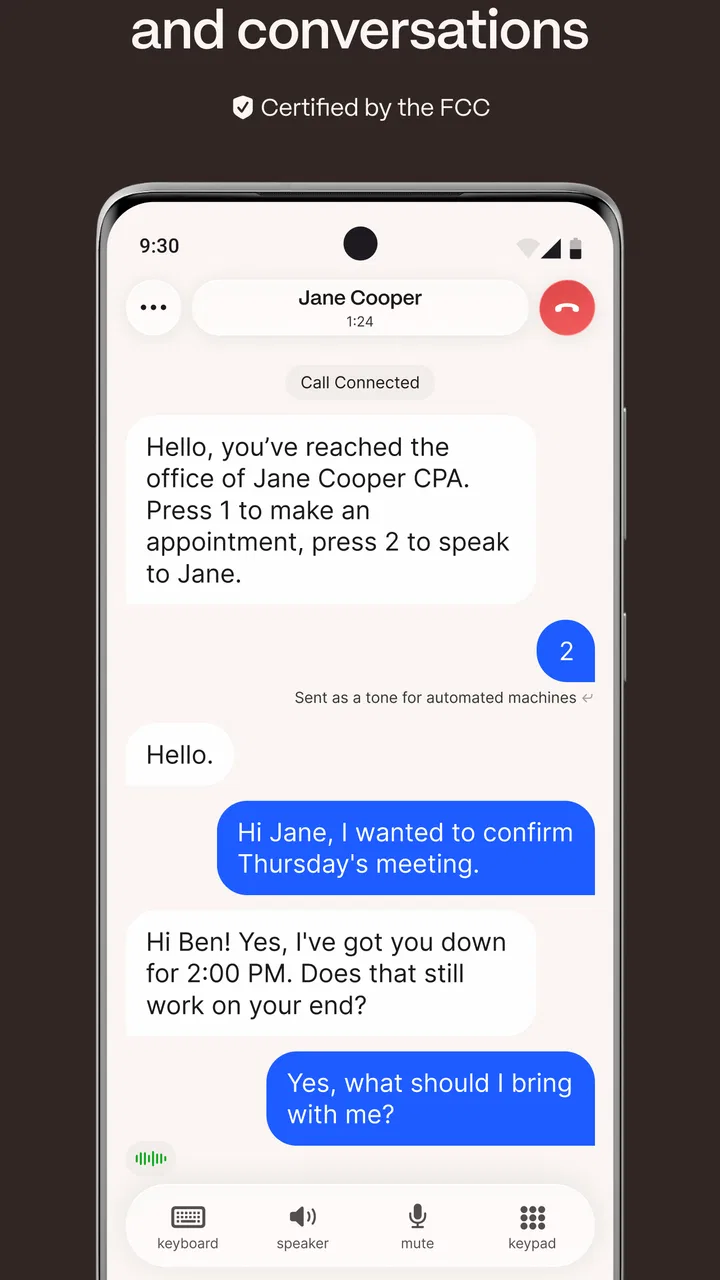
Phone calls are easy to take for granted until hearing clearly becomes difficult, a noisy room makes every sentence uncertain, or a conversation needs to be followed visually rather than by sound alone. I tested Nagish as a communication app built around that exact problem, and its purpose is refreshingly focused: it turns spoken phone conversations into live text while the call is happening. That makes it much more than a general messaging tool, but also means its usefulness depends heavily on how often you need captions during actual calls.
My overall impression is that Nagish is most valuable when a phone call is unavoidable and reading is more dependable than listening. It can make conversations more accessible for people who are deaf or hard of hearing, and it may also help someone who struggles with speech clarity by supporting a text-based way to communicate. I would not treat it as a replacement for every messaging or transcription app, though. Its strongest case is the ordinary telephone call, where familiar alternatives often stop being convenient.
How Nagish fits into real phone conversations
Nagish is a free communication app from Nagish Inc., available for Android users running version 8.0 or later. It is listed for Everyone, which matches the straightforward nature of its purpose: helping people follow calls through on-screen captions rather than adding entertainment or complicated social features. The app was released on September 21, 2020, and the current version is 1.9.12.
You May Also Like

 Blood Strike: 2.5 Anniversary
Blood Strike’s Loadouts Turn Every Drop Into a Tactical Gamble
A close look at Blood Strike’s custom loadouts: how fast access to signature weapons reshapes its battle royale rhythm, rewards preparation, and narrows the gap between fights.

 Pandora - Music & Podcasts
Pandora’s Music Is Easy to Start, but Harder to Recover
Pandora’s strength is its low-effort path from a seed to a station. Its weak spot is how much confidence it asks you to place in connection, setup, and quiet recovery.

 8 Ball Pool
 Is Built on Rivalries, Rematches, and Routine
A close look at the rivalries, rematches, shared routines, and unanswered safety questions that turn a quick pool match into a persistent mobile community.

 Samsung Music
’s Quiet Strength Is Playing What You Already Own
Its reach comes less from spectacle than from dependable access to a personal library. That simplicity is both the app’s strongest retention engine and its ceiling.

 AccuWeather: Weather Radar
AccuWeather Review: A Quick, Clear Forecast for Everyday Decisions
For everyday plans, the best forecast is the one you can understand quickly. AccuWeather makes rain timing, radar, and local conditions easy to act on, with a few trade-offs.

 Hill Climb Racing
Why Hill Climb Racing Still Turns Crashes Into One More Run
A tiny car, a bumpy hill and one more upgrade: Hill Climb Racing keeps resurfacing because its simple chaos makes every near-miss feel personal.
More From Our News Desk
View All News


The central experience is simple to understand. You use the app when you need a phone conversation represented as text in real time. Instead of trying to catch every word through audio alone, you can watch the conversation unfold on the screen. That shift matters in situations where listening is tiring, unreliable, or impossible.
In my view, the important distinction is that this is aimed at calls, not merely recordings made afterward. A normal transcription app may be useful once a meeting or voice note is finished, but that delay is not practical when someone is asking you a question and expects an answer immediately. Nagish addresses the moment when the conversation is taking place.
A realistic example would be calling a clinic to confirm an appointment. If the receptionist speaks quickly, uses unfamiliar terms, or is calling from a busy office, live captions give you another way to verify what was said. You can concentrate on the information in front of you instead of repeatedly asking the other person to repeat themselves. For an important call, that can reduce stress as much as it improves access.
The same idea applies to a delivery problem, a conversation with a school, a utility company call, or a family member who prefers speaking on the phone. The benefit is not that captions make every conversation perfect. The benefit is that they provide a second channel for understanding when sound alone is not enough.
What the free price means in practical terms
Nagish is free to use, so the decision is not about comparing a subscription with another paid service. That is a meaningful advantage for an accessibility-focused tool. Someone can try it without committing money first, and a family member or support worker can recommend it without asking the user to budget for another recurring app.
Free access also changes how I judge the app. I am more willing to accept a little setup friction or the occasional need to check a caption against context when the app removes a direct purchase barrier. At the same time, “free” should not be confused with a guarantee that it will solve every calling situation. The value comes from whether its live captions are useful during the calls you actually make.
The app has an average rating of 3.8 from around 1.8 thousand ratings, with around 681 written reviews. I read that as a mixed but worthwhile signal rather than a reason to dismiss it. Accessibility tools can perform differently depending on speech patterns, background noise, accents, connection conditions, and the type of conversation. A single overall rating cannot tell you whether the experience will suit your particular hearing or communication needs.
Nagish has passed 100 thousand installs, which suggests that it has reached a substantial group of people looking for this kind of calling support. I still recommend treating the first few calls as a personal trial. The right question is not whether every caption will be flawless, but whether the app helps you understand enough of the conversation to participate with more confidence.
The value that appears during difficult calls
The strongest value is reduced dependence on repetition. Asking someone to repeat a sentence once is normal; needing to do it throughout a call can make a simple task exhausting. Captions let you glance at the words, confirm names or numbers, and stay oriented when the speaker changes direction quickly.
There is also a useful difference between hearing something vaguely and seeing it represented as text. If a caller gives an address, appointment time, or reference number, visual text can make it easier to notice whether you understood correctly. I would still verify critical details aloud or by a follow-up message, but the captions provide a practical first check.
Another non-obvious benefit is confidence before dialing. People who avoid phone calls because they expect communication breakdowns may be more willing to contact a business, service provider, or unfamiliar person when they know a text view is available. That psychological value is difficult to measure, but it is central to accessibility: a tool is useful not only when it works, but when it makes necessary tasks feel possible.
I also see value for people who can hear in quiet conditions but struggle in crowds, on public transport, or around household noise. In those cases, captions can act as reinforcement rather than a complete replacement for hearing. The app becomes a backup channel that helps prevent small misunderstandings from becoming a long, frustrating exchange.
For a user with speech-related communication difficulties, the usefulness may depend on how the conversation is handled and what the other person needs. Nagish is particularly relevant when the user needs a phone-based interaction but cannot rely on conventional voice communication alone. It should be viewed as a bridge into ordinary calls, not as a promise that every participant will communicate in exactly the same way.
Small habits that make the experience more useful
My first practical tip is to test the app with someone you trust before using it for an important appointment. Ask the other person to speak at a normal pace, then deliberately introduce conditions that resemble your real life: a quick question, a proper name, a number, or a change of topic. This helps you learn how much attention you need to give the screen and whether you should confirm key information separately.
A second tip is to treat captions as a live aid, not as an unquestionable transcript. If a sentence looks strange, use the surrounding context and ask for clarification rather than acting on a guess. This is especially important for medication names, account details, addresses, and dates. The app can improve access while still requiring ordinary care with consequential information.
A third useful workflow is to prepare a short list before calling. Write down the points you need to cover, then use the captions to check the answers as the conversation progresses. This is more effective than trying to remember everything while watching text and speaking at the same time. For a service call, I would note the issue, the questions, and the information I need the other person to repeat or confirm.
There is also a social advantage to explaining the setup briefly at the start of a call. Saying that you are using captions can encourage the other person to pause between thoughts and spell an unusual name when necessary. That is not a failure of the app; it is a practical way to make the human conversation and the technology work together.
Where it differs from ordinary alternatives
The usual alternative is asking a friend or family member to help with calls. That can work, but it reduces privacy and independence. You may not want another person involved in a medical, financial, employment, or personal conversation. Nagish gives you a chance to handle the call directly, which is a major part of its value even when the captions need occasional checking.
Another alternative is texting or using an internet-based messaging service instead of calling. Text messages are often excellent when the other person is willing to respond in writing, but they are not always available. Businesses may require a phone call, urgent situations may be easier to resolve by voice, and some relatives may simply prefer calling. Nagish targets that gap rather than competing with ordinary chat apps on their own terms.
Dedicated transcription tools are another comparison point. Many are designed for recordings, meetings, lectures, or voice notes. Their workflows may be better when you need a searchable record after the fact. Nagish is more relevant when the immediate goal is to follow a live telephone exchange. Choosing between them depends on timing: live access during a call favors Nagish, while post-event organization may favor a different kind of tool.
Phone accessibility settings can also help with hearing or communication, but they are not necessarily centered on the same call-captioning workflow. The appeal here is having an app specifically associated with making phone conversations readable. That focus can be easier for a user to understand than assembling several general accessibility features and hoping they work together.
The tradeoffs I would consider before relying on it
Live captioning is inherently sensitive to clarity. A quiet speaker who talks at a steady pace is a different challenge from several people speaking over one another in a busy environment. Names, accents, technical vocabulary, and poor audio conditions can all make a caption less dependable. I would not use any live captioning system as the sole authority for information where a mistake could cause harm.
The visual format can also be tiring. Watching text while planning your response takes concentration, especially during a long call. Someone may find that captions solve the hearing problem but create a new attention problem. Short calls are likely to feel easier than extended conversations, and a user may need breaks or a written agenda for anything complicated.
There is a practical learning curve as well. The app’s purpose is clear, but communication tools are only comfortable after you know how to start a call, read the captions, and recover when the conversation becomes unclear. That is why I would not install it for the first time moments before an important appointment. A short practice call is a sensible part of setup.
Another tradeoff is that the person on the other end may not know how to interact with a caption-supported call. Some callers will adapt immediately; others may continue speaking too quickly or assume silence means the connection has failed. A brief explanation can help, but the app cannot control the other person’s patience or communication style.
For users who already communicate comfortably through text and rarely need voice calls, Nagish may offer little day-to-day value. A messaging app could be simpler for those conversations. Likewise, someone looking mainly for meeting transcripts, recorded lectures, or searchable audio notes should consider a tool designed for those tasks instead of choosing a call-captioning app by default.
Who is most likely to benefit
I would recommend trying Nagish first to people who are deaf or hard of hearing and still need to make conventional phone calls. It is also worth considering for anyone whose hearing varies with fatigue, background noise, or the environment. The strongest use case is not casual experimentation; it is a repeated need to participate in calls that cannot conveniently be moved to text.
Family members, caregivers, and support professionals may also find it useful to suggest because the app can support more independent calling. The user can decide when help is needed rather than automatically handing every conversation to someone else. That distinction matters for privacy and dignity, particularly when the call concerns personal services.
People who should be cautious are those expecting perfect word-for-word accuracy in every condition. If a job, legal matter, medical decision, or financial transaction depends on exact wording, captions should be paired with confirmation and, where appropriate, written documentation from the organization involved. Nagish can make the call accessible, but accessibility does not remove the need to verify important facts.
I would also skip it if your main goal is recording and reviewing meetings later, or if nearly all of your communication already happens through text. In those cases, the app’s specific focus may feel narrower than you need. Its strength is precisely its narrowness: it is built around making telephone conversations easier to follow in the moment.
Device and account expectations
Android users need a device running at least version 8.0 of the operating system. That requirement is broad enough to include many older phones, although the actual comfort of reading captions will still depend on the screen, battery condition, and general responsiveness of the device. A larger screen may be easier for extended calls, while a compact phone can remain convenient for quick conversations.
I would think about accessibility beyond the app itself. Increase system text size if needed, choose a comfortable display setting, and keep the phone positioned where the captions are easy to read without blocking the microphone or speaker. These are simple adjustments, but they can determine whether the app feels like practical assistance or another source of strain.
Because this is a communication tool, I would also make sure the app is ready before an urgent call rather than assuming installation alone is enough. Open it, become familiar with its call workflow, and try a low-pressure conversation. That preparation answers the question many new users have: whether they can depend on it when they are already under pressure. Confidence comes from practice, not just from having the app installed.
My verdict on its value
Nagish is worth trying if live captions could change whether you can comfortably make or receive phone calls. The fact that it is free makes that trial especially easy to justify, and its focus is more relevant than a general transcription app when the conversation needs to be understood as it happens. I value it most as an independence tool: something that can reduce reliance on another person and make ordinary services more reachable.
I would not describe it as a universal communication solution. Caption quality can vary with the conversation, reading the screen can be tiring, and important information still deserves confirmation. Someone who mainly needs recorded-audio transcription or prefers text-only communication may get better results elsewhere.
Still, for the right user, those limitations do not erase the central benefit. A free app that helps turn a stressful phone call into a conversation you can follow is offering meaningful practical value. After considering its purpose, current version 1.9.12, Everyone age classification, and established presence in the communication category, my recommendation is straightforward: try it with a trusted person first, learn your own workflow, and keep it available for the calls where visual access matters most.
FAQs for Rylo: Live Call Captions
01What is Nagish: Caption Your Calls and how does it work?
Nagish: Caption Your Calls is an app designed to provide real-time captions for phone conversations, making it easier for people with hearing impairments to communicate effectively. It uses advanced speech recognition technology to convert spoken words into text, displayed on your screen during calls. This ensures you never miss out on important details.
02Is Nagish available for both Android and iOS devices?
Yes, Nagish is available for download on both Android and iOS platforms. The app is designed to integrate seamlessly with your device's existing call functionality, providing a smooth and user-friendly experience regardless of your operating system. Check the respective app stores for download links.
03Does Nagish require an internet connection to function?
Yes, Nagish requires a stable internet connection to provide real-time captioning. The app relies on cloud-based speech recognition to convert audio to text, ensuring accurate and up-to-date captions during calls. Make sure you have a reliable Wi-Fi or mobile data connection for optimal performance.
04Is Nagish secure to use for private conversations?
Nagish prioritizes user privacy and security. It employs encryption and secure servers to ensure that your conversations remain confidential. However, as with any app that handles sensitive information, it's advised to review their privacy policy to understand how your data is managed and protected.
05Are there any additional costs or subscriptions required to use Nagish?
Nagish may offer a free version with basic features, but advanced functionalities might require a subscription. It's important to check the app's pricing details on the app store or within the app itself to understand any potential costs. Often, such apps provide a trial period to explore premium features before committing.
Pros
- Easy-to-use interface for quick navigation.
- Real-time captioning is highly accurate.
- Supports multiple languages for inclusivity.
- Customizable notification settings.
- Lightweight app with minimal battery usage.
Cons
- Requires a stable internet connection.
- Limited free version features.
- Some languages lack full support.
- Occasional delay in caption updates.
- Not optimized for older devices.

Rylo: Live Call Captions
Gallery